Workstation Setups
  • Home
  • Add Yours
  • Categories
    • Mac
    • PC
    • PC & Mac
  • About
    • About
    • FAQ
    • Contact
  • Network
    • GamingSetups.com
  • 500
    Twitter Followers
  • 860
    Facebook Fans
  • 630
    RSS Subscribers

Home » Mac » Mac Home Office Setup

Mac Home Office Setup
Dec 23

Mac Home Office Setup

by enverr - Mac - 43960 Views

Tweet

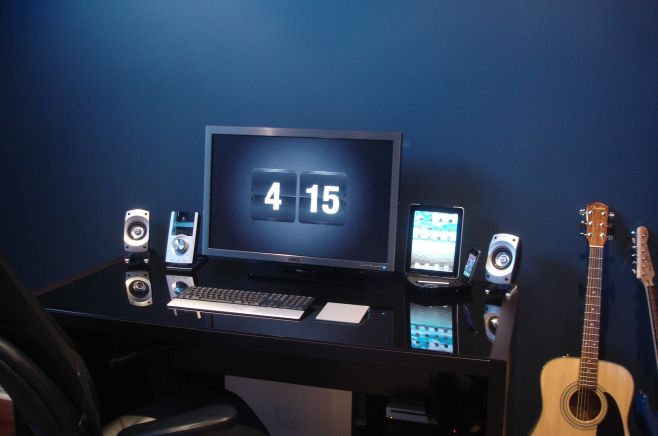
This is the setup i work with, i edit photos and videos mostly.

Monitor(s)/Display(s):

  • Dell 30″ Monitor (3008WFP)

Computer(s):

  • Apple Mac Pro Intel Xeon 2.26 8-core. 16GB ram, 1x640GB hardrive, 2x2TB Harddrives

Accessories:

  • Logitech z-5500 Sound System
  • Logitech diNovo Keyboard Mac Edition
  • Apple Magic Trackpad
  • Lacie 1TB external harddrive
  • iPad
  • iPhone 4
  • Griffin Dual Dock

Recently Published

The Wizard Setup
»

The Wizard Setup

The Wizard of the internet setup.

Holiday Giveaway presented by Linksys & Belkin
»

Holiday Giveaway presented by Linksys & Belkin

In December, WorkstationSetups.com is teaming up with Linksys and Belkin to bring you the Holiday Giveaway!

»

Home Desktop

My name is Jonathan, this is my home desktop setup in my room that serve as a home entertainment cum work station

What's Hot

  • article image

    Mac Home Office Setup

    43961 Views
  • PC Home Office Setup

    PC Home Office Setup

    55411 Views
  • article image

    Jeff Claeson’s Design Office

    41740 Views
  • article image

    Gaming/Office Setup

    36725 Views
  • Desk1

    Mac Home Office

    34048 Views
  • hendrick_ruoff

    Mac Home Workstation

    30991 Views

Post Tags

  • Dell
  • iPad
  • iPhone
  • iPhone 4
  • Logitech
  • Mac Pro
  • z5500

10 Comments

  • comment avatar mjohnoson72 December 23, 2010

    I love that desktop wallpaper, where can I find it?

  • comment avatar kamal December 23, 2010

    simple and super!

  • comment avatar Gavin December 24, 2010

    Nice wall and desktop! (screen and actual). Makes me want to just poke the wall like it’s water and see ripples go all over, lol.

  • comment avatar bw December 28, 2010

    the screensaver appears to be flipclock
    http://www.macthemes.net/forum/viewtopic.php?id=16793914&p=1

  • comment avatar Lew January 3, 2011

    Beast of a setup mate.

  • comment avatar enverr January 4, 2011

    Thanks for all the comments. And yeah as bw already pointed out, it is the flipclock. I actually use it as my wallpaper as well using screenwatcher which lets you make any screensaver a live wallpaper ( http://www.apple.com/downloads/macosx/icons_screensavers/screenwatcher.html )

  • comment avatar Dan Allen C. Pantinople January 24, 2012

    What really caught my eye is the color blue of your wall! really awesome! i wonder what kind of paint you used? can you email me? i was planning to color my room blue

  • comment avatar enverr January 25, 2012

    thank you for the kind words. the paint was purchased from benjamin moore. i’m not sure where you are located though so it may not be in your area if it is out of north america. the paints name is hudson bay blue, paint type is aura and finish was matte. best of luck with your painting project.

  • comment avatar Dan Allen C. Pantinople January 25, 2012

    Thanks for the reply! im in the philippines so benjamin moore is not an option, ill try finding the color instead..oh and btw, your screensaver really matches the wall..really cool!

  • comment avatar enverr January 26, 2012

    Thanks! Since you live in the Philippines, the best way to match that I can think of would be to look up the colour on benjamin moores website, and then print that off and try and match as close as possible.

Leave a Comment

Cancel reply

Your email address will not be published. Required fields are marked *

Copyright 2014 WorkstationSetups.com
  • Home
  • Add Yours
  • About
  • Contact
  • FAQ
  • Archives
  • Sitemap
  • Privacy Policy
  • Terms Of Service