
Workstation Setups
  • Home
  • Add Yours
  • Categories
    • Mac
    • PC
    • PC & Mac
  • About
    • About
    • FAQ
    • Contact
  • Network
    • GamingSetups.com
  • 500
    Twitter Followers
  • 860
    Facebook Fans
  • 630
    RSS Subscribers

Home » Mac » Macbook Workstation

Macbook Workstation
Apr 16

Macbook Workstation

by stephen9822 - Mac - 1455 Views

Tweet

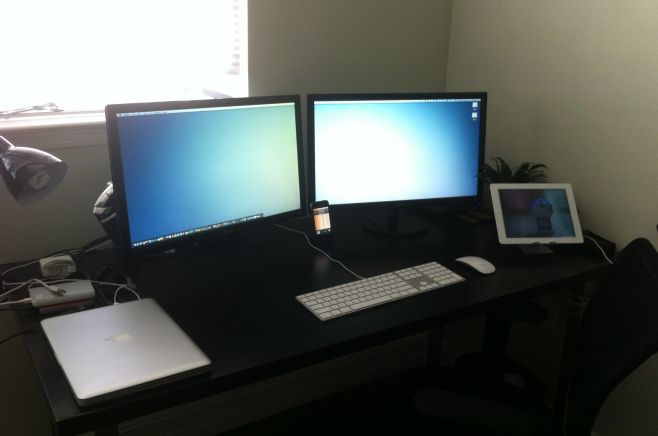
This is my Macbook Workstation

Monitor(s)/Display(s):

  • x2 24″ ASUS 2MS VS248H-P R
  • DualHead2Go

Computer(s):

  • 13″ Macbook Unibody
    2.4 GHz Intel Core Duo
    4GB RAM
    60SSD
    250GB HDD (in optical bay)

Furniture:

  • Ikea VIKA AMON/VIKA MOLIDEN desk

Accessories:

  • Ergotron MX desk Mount Arm
  • Elago P2 iPad Stand
  • Apple iPad 3
  • Apple iPhone
  • Apple Magic Mouse
  • Apple Wired Keyboard
  • 350GB WD Passport Drive
  • 1TB WD Passport Drive
  • Motorola S305 Bluetooth Headset

Recently Published

Photo-Jun-01-12-51-41-PM
»

Stark Lab v1 (Systems Architect Mood-Lit Home Office)

I’m a cloud infrastructure-as-a-service (IaaS) systems architect and cloud software engineer (Bash, PHP, MySQL) and work from home full time.
I manage a datacenter private cloud and use the two Apple displays for productivity and RDP tasks and the two HP vertical monitors for NOC graphs and alerts.
Hope you enjoy and find inspiration for your own setup.

2011-01-01-14.21.12
»

SCF Setup (Simple, Clean, Faster)

My name is Jean, i live in Brazil and i’m a professional CS:GO player

desk
»

2650x1600x3 never going back

My home desktop! Great for triple screen gaming, monitoring lots of servers & security cameras!

What's Hot

  • Mac Home Office

    Mac Home Office

    18952 Views
  • Home Workstation

    Home Workstation

    9721 Views
  • olore

    Olore Hypermedia setup

    7049 Views
  • advertise here
  • My Gaming & Workstation

    My Gaming & Workstation

    4977 Views
  • article image

    mac + pc media setup

    3523 Views
  • pchomeofficesetup

    PC Home Office Setup

    18137 Views

Post Tags

  • dual
  • DualHead2Go
  • ergotron
  • iPad
  • iPhone
  • macbook

5 Comments

  • comment avatar William Li April 16, 2012

    how did you get the menu bar to span across both desktop?

  • comment avatar Z Studios April 16, 2012

    There is an App called second bar that makes a second bar on your secondary monitor.

  • comment avatar Stephen April 16, 2012

    I actually used DualHead2Go. It displays both monitors as one.

  • comment avatar AdamInNi May 17, 2012

    Wow, very nice setup, man :) Where did you get that wallpaper?

  • comment avatar Stephen July 21, 2012

    Here you go. Got it from Deviantart http://elusive.deviantart.com/art/Calm-157643359 enjoy!

Leave a Comment

Cancel reply

Your email address will not be published. Required fields are marked *

Copyright 2014 WorkstationSetups.com
  • Home
  • Add Yours
  • About
  • Contact
  • FAQ
  • Archives
  • Sitemap
  • Privacy Policy
  • Terms Of Service