
Workstation Setups
  • Home
  • Add Yours
  • Categories
    • Mac
    • PC
    • PC & Mac
  • About
    • About
    • FAQ
    • Contact
  • Network
    • GamingSetups.com
  • 500
    Twitter Followers
  • 860
    Facebook Fans
  • 630
    RSS Subscribers

Home » Mac » My Workspace

My Workspace
Apr 27

My Workspace

by psleda - Mac - 4639 Views

Tweet

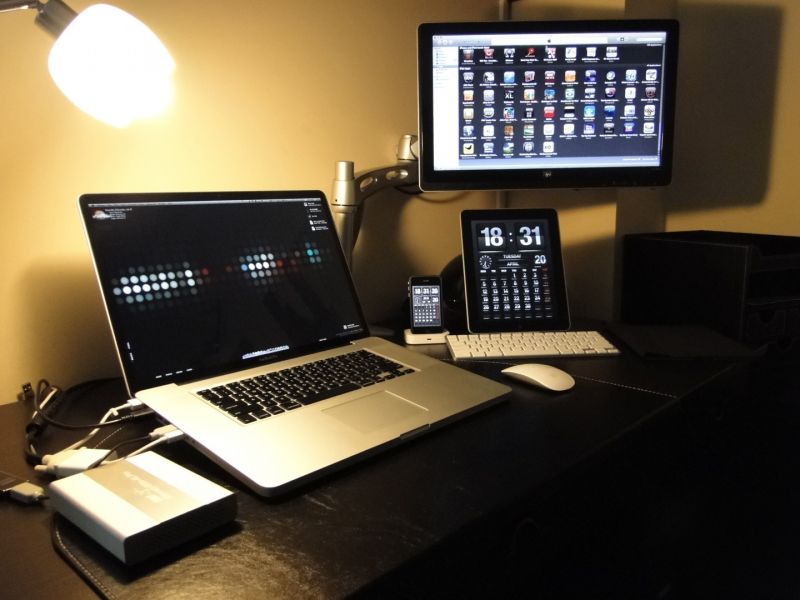
My name is Leda. I am a dentist and an apple fan from Istanbul .I like to use electronic gadgets in my personal life

Monitor(s)/Display(s):

  • HP 2010i 1600×900 res. VGA,DVI monitor

Computer(s):

  • Unibody Macbook Pro 17″ 2.66ghz 4 gb ram 500 gb 5400rpm hd

Accessories:

  • iPad 32gb wifi on apple keybaord dock,
  • iPhone 3gs 32gb black on apple universal dock,
  • magic mouse,
  • owc mercury elite 25″ hd enclosure with esata-2 fw 800-usb ports,
  • ergotron desk stand,
  • apple ipad case,
  • sandisk cruzer 16gb usb stick,
  • apple minidisplay port -dvi adapter.
    My 3.5 extrenal hard drives(wd my book studio 2TB raid 1,wd my book studio 1TB,2×500 gb hd in dexonic dual drive hd enclosure) and belkin 7 port powered usb hub is not seen in this pictures,they are located under my desk.

Recently Published

Photo-Jun-01-12-51-41-PM
»

Stark Lab v1 (Systems Architect Mood-Lit Home Office)

I’m a cloud infrastructure-as-a-service (IaaS) systems architect and cloud software engineer (Bash, PHP, MySQL) and work from home full time.
I manage a datacenter private cloud and use the two Apple displays for productivity and RDP tasks and the two HP vertical monitors for NOC graphs and alerts.
Hope you enjoy and find inspiration for your own setup.

2011-01-01-14.21.12
»

SCF Setup (Simple, Clean, Faster)

My name is Jean, i live in Brazil and i’m a professional CS:GO player

desk
»

2650x1600x3 never going back

My home desktop! Great for triple screen gaming, monitoring lots of servers & security cameras!

What's Hot

  • Mac Home Office

    Mac Home Office

    18100 Views
  • Home Workstation

    Home Workstation

    9375 Views
  • olore

    Olore Hypermedia setup

    6494 Views
  • advertise here
  • My Gaming & Workstation

    My Gaming & Workstation

    4751 Views
  • article image

    mac + pc media setup

    3005 Views
  • pchomeofficesetup

    PC Home Office Setup

    17550 Views

Post Tags

  • apple
  • Home Office
  • HP
  • ikea
  • iPad
  • iPhone 3GS
  • Mac
  • MacBook Pro
  • my mac workspace
  • workstation minidisplay port

9 Comments

  • comment avatar pumpithu April 27, 2010

    oh …. you can sent wallpaper to me please.

  • comment avatar Leda April 27, 2010

    here si the link to the wallpaper;

    http://jrathage.deviantart.com/art/7493-159790648

  • comment avatar Joe Myers May 1, 2010

    Great Setup! What is the app you are using on your ipad and iphone? I would really like to get it for my iphone. Thanks!

  • comment avatar WorkstationSetups.com May 1, 2010

    @Joe : I think it’s FlipTime http://itunes.apple.com/app/fliptime/id315466610?mt=8

  • comment avatar Leda May 2, 2010

    Yes it is FlipTime XL for ipad and FliptTme for iphone

  • comment avatar Joe Myers May 3, 2010

    Hey Leda, thank you very much for the info on that app. I got it for my iphone and it works great. Thanks for the tip!

  • comment avatar Leda May 4, 2010

    You’re welcome.

  • comment avatar Bruce May 19, 2010

    oh …. you can sent wallpaper to me please.

  • comment avatar Leda May 20, 2010

    I gave the link in my previous post…

Leave a Comment

Cancel reply

Your email address will not be published. Required fields are marked *

Copyright 2014 WorkstationSetups.com
  • Home
  • Add Yours
  • About
  • Contact
  • FAQ
  • Archives
  • Sitemap
  • Privacy Policy
  • Terms Of Service