Workstation Setups
  • Home
  • Add Yours
  • Categories
    • Mac
    • PC
    • PC & Mac
  • About
    • About
    • FAQ
    • Contact
  • Network
    • GamingSetups.com
  • 500
    Twitter Followers
  • 860
    Facebook Fans
  • 630
    RSS Subscribers

Home » Mac » Stefan Didak’s Home Office
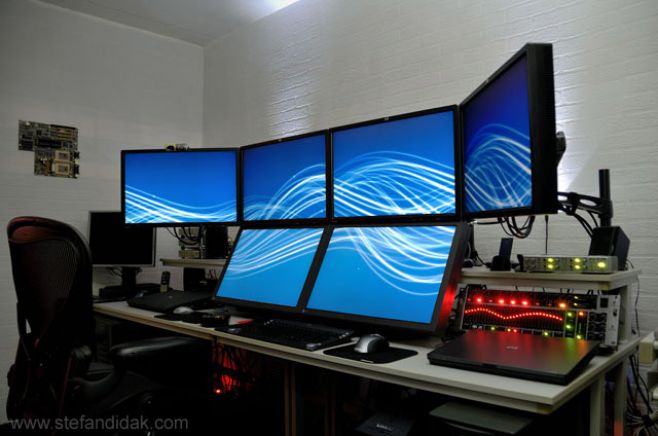
Stefan Didak’s Home Office
Oct 17

Stefan Didak’s Home Office

by Stefan Didak - Mac · PC - 4380 Views

Tweet

I think half of the internet has already seen my setup. Just adding fit for completeness sake. :-)

Monitor(s)/Display(s):

  • Main area: 2 x Eizo 24″, 4 x HP 24″
  • Side area: 3 x Huyndai 17″
  • Other side area: 1 x 27″ iMac

Computer(s):

  • Really too much to mention. For details, check http://www.stefandidak.com/office/

Accessories:

  • For details, check http://www.stefandidak.com/office/

Recently Published

Photo-Jun-01-12-51-41-PM
»

Stark Lab v1 (Systems Architect Mood-Lit Home Office)

I’m a cloud infrastructure-as-a-service (IaaS) systems architect and cloud software engineer (Bash, PHP, MySQL) and work from home full time.
I manage a datacenter private cloud and use the two Apple displays for productivity and RDP tasks and the two HP vertical monitors for NOC graphs and alerts.
Hope you enjoy and find inspiration for your own setup.

2011-01-01-14.21.12
»

SCF Setup (Simple, Clean, Faster)

My name is Jean, i live in Brazil and i’m a professional CS:GO player

desk
»

2650x1600x3 never going back

My home desktop! Great for triple screen gaming, monitoring lots of servers & security cameras!

What's Hot

  • Mac Home Office

    Mac Home Office

    19690 Views
  • Home Workstation

    Home Workstation

    9955 Views
  • olore

    Olore Hypermedia setup

    7385 Views
  • advertise here
  • My Gaming & Workstation

    My Gaming & Workstation

    5117 Views
  • pchomeofficesetup

    PC Home Office Setup

    18505 Views
  • article image

    mac + pc media setup

    3647 Views

Post Tags

  • Eizo
  • Home Office
  • Huyndai
  • iMac
  • Stefan Didak

6 Comments

  • comment avatar mk October 21, 2010

    OMG, are you kidding :-) What are you doing with this setup? The U.S. Defense Department must be jelous as hell ;-) You should rent the setup for 3D Realtime Simulators…

    to be honest, why not buying one big HD panel… this would give less cables and power consumption.

  • comment avatar Stefan Didak October 22, 2010

    A single HD panel would never support the number of pixels and screen real-estate (or quality) that multiple monitors do. It also wouldn’t work too well if you’ve got a dozen systems linked to the multiple inputs to provide a multi-system-multi-multi-monitor setup.

  • comment avatar carlos November 21, 2010

    Has your eyesight suffered from this ? and do you get pain on your neck from moving your head so much ?
    lol basically how are you affected physically from the monitors ….your hands, eyes, etc

  • comment avatar Stefan Didak November 22, 2010

    No neckpain or other discomfort. If it caused that I’d set it up differently, duh. :-)

    The only minor physical difference is that I glow blue in the dark and wherever I walk I disrupt powerlines and telephones. But I’m not sure it’s because of the home office. :-)

  • comment avatar carlos November 22, 2010

    Lol alright. One more questions Mr. Didak,
    What chair is that ? You must have a comfy comfy chair that offers good back support yes ?
    I bet not many people ask about your chairs.

  • comment avatar Stefan Didak November 23, 2010

    Actually, I have gotten quite a few questions about the chair but I think a lot of people recognize it from its style and shape already. It’s a Herman Miller Aeron. And, indeed, if you do a lot of work sitting down a good chair is well worth the investment.

Leave a Comment

Cancel reply

Your email address will not be published. Required fields are marked *

Copyright 2014 WorkstationSetups.com
  • Home
  • Add Yours
  • About
  • Contact
  • FAQ
  • Archives
  • Sitemap
  • Privacy Policy
  • Terms Of Service