
Workstation Setups
  • Home
  • Add Yours
  • Categories
    • Mac
    • PC
    • PC & Mac
  • About
    • About
    • FAQ
    • Contact
  • Network
    • GamingSetups.com
  • 500
    Twitter Followers
  • 860
    Facebook Fans
  • 630
    RSS Subscribers

Home » PC » Workstation Geekdom

Workstation Geekdom
Oct 31

Workstation Geekdom

by totalAldo - PC - 4481 Views

Tweet

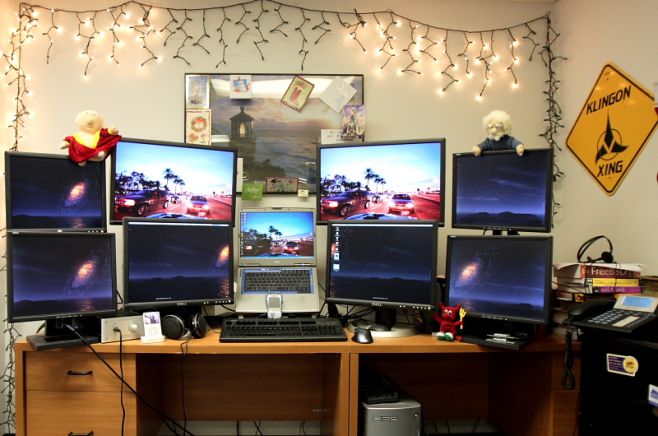
2005 Computer Setup. Two computers power the 9 displays. The laptop ran Windows XP and the desktop ran FreeBSD. Synergy allows the use of one mouse and keyboard to control input devices on both machines via the network. (Yes, I used an ssh tunnel for the synergy connection). The slow draw rate on the lower monitors caused me to later consolidate them into 2 larger monitors powered by one graphics card instead of the 3 cards used here.

Monitor(s)/Display(s):

  • 2×24″ Dell.
  • 2×21″ Dell.
  • 4×17″ Dell.
  • 1×15″ Laptop Display

Computer(s):

  • Dell Inspiron 8500
  • Dell Dimension XPS (Dual Core Pentium 4 w/HT @ 3.2GHz)

Accessories:

  • X-Can Headphone Amp.
  • iPod 5G.
  • Sennheiser 650HD
  • DAS Keyboard (version 1).
  • Logitech Mouse
  • Grandstream GXP-2000.
  • Treo 650.

Recently Published

Photo-Jun-01-12-51-41-PM
»

Stark Lab v1 (Systems Architect Mood-Lit Home Office)

I’m a cloud infrastructure-as-a-service (IaaS) systems architect and cloud software engineer (Bash, PHP, MySQL) and work from home full time.
I manage a datacenter private cloud and use the two Apple displays for productivity and RDP tasks and the two HP vertical monitors for NOC graphs and alerts.
Hope you enjoy and find inspiration for your own setup.

2011-01-01-14.21.12
»

SCF Setup (Simple, Clean, Faster)

My name is Jean, i live in Brazil and i’m a professional CS:GO player

desk
»

2650x1600x3 never going back

My home desktop! Great for triple screen gaming, monitoring lots of servers & security cameras!

What's Hot

  • Mac Home Office

    Mac Home Office

    19712 Views
  • Home Workstation

    Home Workstation

    9969 Views
  • olore

    Olore Hypermedia setup

    7397 Views
  • advertise here
  • My Gaming & Workstation

    My Gaming & Workstation

    5123 Views
  • pchomeofficesetup

    PC Home Office Setup

    18529 Views
  • article image

    mac + pc media setup

    3655 Views

Post Tags

  • Dell
  • Dimension XPS
  • FreeBSD
  • Inspiron
  • iPod
  • Laptop
  • Logitech
  • PC
  • Sennheiser
  • Workstation

9 Comments

  • comment avatar Ryan November 3, 2009

    Why so many monitors?

  • comment avatar Heather B November 9, 2009

    Damn this is, wow how can I describe it? What is the word im looking for?

    SEXY!!!!

  • comment avatar Pontus December 10, 2009

    Now that’s just plain silly :P

  • comment avatar Mkk April 22, 2010

    hmm, I would say this just show off and not a professional environment, because this much screen shares this much focus and attention so it creates a confusing environment.

    sorry to totalAldo but this what I feel.

    thanks

  • comment avatar beastie August 29, 2010

    !!!WOW! it is nice! +1

  • comment avatar Karthik March 19, 2011

    this is sexy but lame i should say….

  • comment avatar fake December 22, 2011

    it’s not true fake XD

  • comment avatar w4rr10r January 6, 2012

    @Mkk
    Not really. I’m using one window per virtual desktop, with more screens I’d use one window per screen. One screen for e-mail and IRC, one screen for web browser, two screens for documentation, one screen for the work I’m doing (lots of code) and one screen for the results of my work (testing). That’s six screens. And what about guys doing QA or server administration (one SSH session per screen)?

  • comment avatar Peter E March 16, 2012

    its not fake, its well done if you ask me.

Leave a Comment

Cancel reply

Your email address will not be published. Required fields are marked *

Copyright 2014 WorkstationSetups.com
  • Home
  • Add Yours
  • About
  • Contact
  • FAQ
  • Archives
  • Sitemap
  • Privacy Policy
  • Terms Of Service