
Workstation Setups
  • Home
  • Add Yours
  • Categories
    • Mac
    • PC
    • PC & Mac
  • About
    • About
    • FAQ
    • Contact
  • Network
    • GamingSetups.com
  • 500
    Twitter Followers
  • 860
    Facebook Fans
  • 630
    RSS Subscribers

Home » PC » Digiguru Workstation

Digiguru Workstation
Jan 10

Digiguru Workstation

by Digiguru - PC - 2868 Views

Tweet

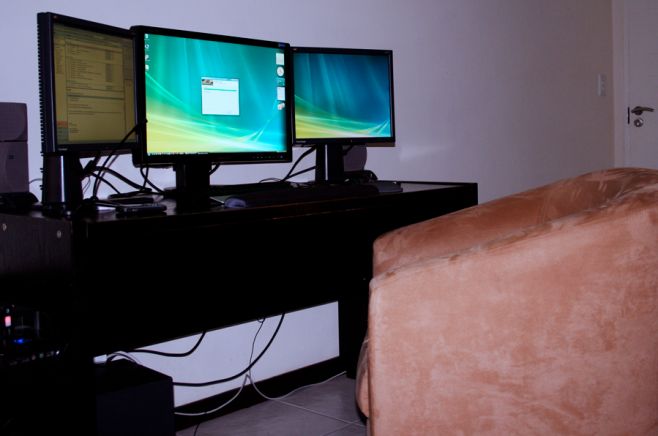
Digiguru is the showcase of Craig Jameison, a Creative Director at Ogilvy Interactive. This is my home setup and where most of the Digiguru work is done.

Monitor(s)/Display(s):

  • Samsung 24″
  • 2 x ViewSonic 17″

Computer(s):

  • CMStacker Desktop Case,
  • Intel Core 2 Quad Core Q9450,
  • 8GB DDR2 RAM,
  • NVidia Dual 9600 GT Graphics

Accessories:

  • Altec Lansing 5.1 Surround Sound,
  • HP Officejet All-in-One printer,
  • Logitec Illuminated Keyboard,
  • Microsoft laser mouse,
  • Linksys Wireless-G 2.4 Router

Recently Published

Photo-Jun-01-12-51-41-PM
»

Stark Lab v1 (Systems Architect Mood-Lit Home Office)

I’m a cloud infrastructure-as-a-service (IaaS) systems architect and cloud software engineer (Bash, PHP, MySQL) and work from home full time.
I manage a datacenter private cloud and use the two Apple displays for productivity and RDP tasks and the two HP vertical monitors for NOC graphs and alerts.
Hope you enjoy and find inspiration for your own setup.

2011-01-01-14.21.12
»

SCF Setup (Simple, Clean, Faster)

My name is Jean, i live in Brazil and i’m a professional CS:GO player

desk
»

2650x1600x3 never going back

My home desktop! Great for triple screen gaming, monitoring lots of servers & security cameras!

What's Hot

  • Mac Home Office

    Mac Home Office

    19680 Views
  • Home Workstation

    Home Workstation

    9953 Views
  • olore

    Olore Hypermedia setup

    7379 Views
  • advertise here
  • My Gaming & Workstation

    My Gaming & Workstation

    5115 Views
  • pchomeofficesetup

    PC Home Office Setup

    18493 Views
  • article image

    mac + pc media setup

    3645 Views

Post Tags

  • Altec Lansing
  • designer
  • Digiguru
  • HP
  • Linksys
  • Logitec
  • PC
  • Samsung
  • ViewSonic
  • Workstation

3 Comments

  • comment avatar Yashvir Bagwandeen January 10, 2010

    Sweet setup! I have dual screens but what do you use the 3rd one for?

  • comment avatar Digiguru February 23, 2010

    I use one monitor to have my documents on, one for the man design/flash area and one for coding, it really speeds things up as I’m not constantly maximizing and minimizing windows

  • comment avatar Yashvir Bagwandeen February 24, 2010

    Well I can see that it works out for you. Your website is intensely crazy! Glad to see you’re a Windows guy

Leave a Comment

Cancel reply

Your email address will not be published. Required fields are marked *

Copyright 2014 WorkstationSetups.com
  • Home
  • Add Yours
  • About
  • Contact
  • FAQ
  • Archives
  • Sitemap
  • Privacy Policy
  • Terms Of Service