Workstation Setups
  • Home
  • Add Yours
  • Categories
    • Mac
    • PC
    • PC & Mac
  • About
    • About
    • FAQ
    • Contact
  • Network
    • GamingSetups.com
  • 500
    Twitter Followers
  • 860
    Facebook Fans
  • 630
    RSS Subscribers

Home » Mac » My Mac Pro Workstation

My Mac Pro Workstation
Apr 18

My Mac Pro Workstation

by Cinematics19 - Mac - 2394 Views

Tweet

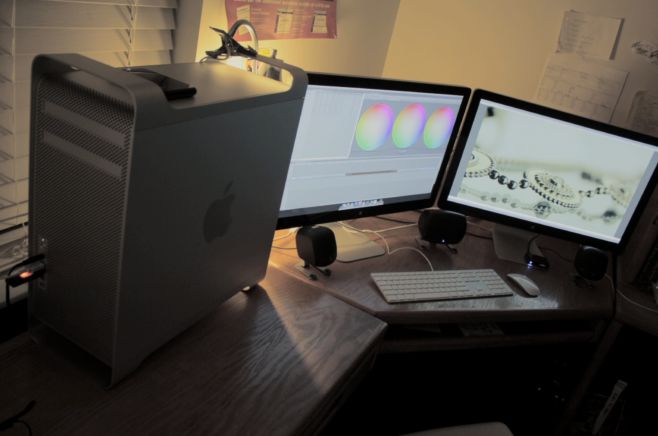
This is the Mac Pro setup I use for creating motion graphics, commercials, and independant films. I shoot with 2 DSLRS, edit in Final Cut Pro 7 and composite with Motion 4.

Monitor(s)/Display(s):

  • 2x 27″ LED 2560×1440 Apple Cinema Displays (via Mini Display Port)

Computer(s):

  • Mac Pro 12 Core, 12GB DDR3 Memory, Raid pro w/ 3 x 2TB Hitachi 7200rpm HDD’s, and 2 ATI Radeon 5770 1GB Graphics cards

Furniture:

  • Fold out chair from walmart ;) and a large oak corner desk (No brand name.)

Accessories:

  • Apple Magic Mouse
  • Full QWERTY Apple wired keyboard
  • Logitech 5.1 surround sound system
  • Toshiba 750GB Jump Drive formatted to Mac OSX Journaled
Recently Published

homeoffice
»

Macbook Workstation

My name is Ron and here is my home office set up.

My Favorite Spot
»

My Favorite Spot

Hi, My name is Aliff JJ, 30 yrs old. This is my home Office for video editing & motion graphic design using with Final Cut Pro 7 and After Effects

workstation-pic
»

Tom of All Trades Setup

Hi, my name is Tom. I am 16 and live in Australia. This is my setup which I use to pretty much everything. I use it for drawing concept art, graphic design, video editing, recording music, DJ-ing, photography and gaming.
Before you ask, no, I am not spoilt by my parents. I have personally worked hard to save up for everything that is listed and/or pictured.

What's Hot

  • article image

    Mac Home Office Setup

    37758 Views
  • article image

    Jeff Claeson’s Design Office

    35073 Views
  • Desk1

    Mac Home Office

    27455 Views
  • advertise here
  • article image

    Gaming/Office Setup

    28762 Views
  • hendrick_ruoff

    Mac Home Workstation

    24574 Views
  • article image

    My base of operations

    25946 Views

Post Tags

  • apple
  • Apple Cinema Displays
  • Logitech
  • Mac OSX
  • Mac Pro 12 Core
  • toshiba

8 Comments

  • comment avatar Ben April 18, 2012

    why do you use final cut pro 7 and motion 4, why not upgrade to fcpx and motion 5?? Anyway awesome setup i do a similar thing to you in my setup!!!! Also what cameras? i use a cannon 1100D at the moment while my budget is still quite low±

  • comment avatar Linas April 18, 2012

    You’re a professional, right? I made a video for my college project using Premiere. I had a lot of fun. I just wanted to ask why do you choose your software and what do you think of Premiere?

  • comment avatar Linas April 18, 2012

    Also, lovely setup man! :))

  • comment avatar Anders April 18, 2012

    WOW! That was amazing!

  • comment avatar Cinematics19 April 26, 2012

    @Ben I’m still working on adapting to the new final cut and motion via the trial on the apple website. Quite the overhaul FCP has been given. I primarily use a t2i for my shooting, occaisionally a 7D depending on our time frame.

    @Linas It depends on your definition of professional, considering that i’m 18 and have only been shooting video since 2007.

  • comment avatar Linas May 3, 2012

    It’s been five years already :)

  • comment avatar paul May 8, 2012

    thats a beast of a setup-very nice.have you done a geek bench score ?.

  • comment avatar Cinematics19 May 12, 2012

    @paul Yes I have actually. It scored a 19807.

Leave a Comment

Cancel reply

Your email address will not be published. Required fields are marked *

Copyright 2014 WorkstationSetups.com
  • Home
  • Add Yours
  • About
  • Contact
  • FAQ
  • Archives
  • Sitemap
  • Privacy Policy
  • Terms Of Service