
Workstation Geekdom
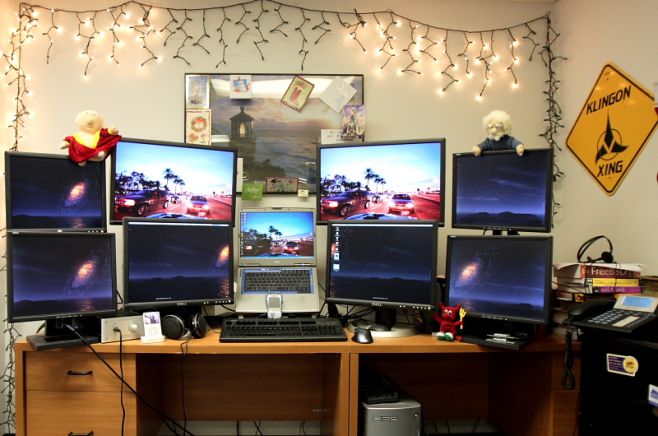
2005 Computer Setup. Two computers power the 9 displays. The laptop ran Windows XP and the desktop ran FreeBSD. Synergy allows the use of one mouse and keyboard to control input devices on both machines via the network. (Yes, I used an ssh tunnel for the synergy connection). The slow draw rate on the lower monitors caused me to later consolidate them into 2 larger monitors powered by one graphics card instead of the 3 cards used here.
Monitor(s)/Display(s):
- 2×24″ Dell.
- 2×21″ Dell.
- 4×17″ Dell.
- 1×15″ Laptop Display
Computer(s):
- Dell Inspiron 8500
- Dell Dimension XPS (Dual Core Pentium 4 w/HT @ 3.2GHz)
Accessories:
- X-Can Headphone Amp.
- iPod 5G.
- Sennheiser 650HD
- DAS Keyboard (version 1).
- Logitech Mouse
- Grandstream GXP-2000.
- Treo 650.


Nov 03, 2009 @ 11:53:56
Why so many monitors?
Nov 09, 2009 @ 15:34:45
Damn this is, wow how can I describe it? What is the word im looking for?
SEXY!!!!
Dec 10, 2009 @ 13:56:58
Now that’s just plain silly
Apr 22, 2010 @ 13:23:31
hmm, I would say this just show off and not a professional environment, because this much screen shares this much focus and attention so it creates a confusing environment.
sorry to totalAldo but this what I feel.
thanks
Aug 29, 2010 @ 21:51:58
!!!WOW! it is nice! +1
Mar 19, 2011 @ 09:50:36
this is sexy but lame i should say….
Dec 22, 2011 @ 10:05:10
it’s not true fake XD
Jan 06, 2012 @ 08:12:29
@Mkk
Not really. I’m using one window per virtual desktop, with more screens I’d use one window per screen. One screen for e-mail and IRC, one screen for web browser, two screens for documentation, one screen for the work I’m doing (lots of code) and one screen for the results of my work (testing). That’s six screens. And what about guys doing QA or server administration (one SSH session per screen)?
Mar 16, 2012 @ 07:07:57
its not fake, its well done if you ask me.